
DocKit Agentic MongoDB GUI Client - Talk to Your Data in Natural Language
If you're shopping for a MongoDB desktop client in 2026, you'll hit an awkward fact: a lot of the tools that used to be popular are no longer worth considering. Robo 3T's last release was 2021. umongo's final release was 2013. Mongoku's official release is still stuck on 2019. They still carry a few thousand GitHub stars, but they don't fit a modern development setup.
The AI story isn't much better. Compass and Studio 3T both ship some kind of AI chat, but it's just a chat box: you ask, it answers in turns, and what comes back is a simple query. There's no context, no judgment based on your schema, and it won't operate the database for you.
DocKit was built for that gap. It's a NoSQL desktop client with a built-in Data AI Agent covering MongoDB, Elasticsearch, OpenSearch, and DynamoDB, free and open source.
What is DocKit
DocKit is an open-source NoSQL desktop client with a built-in Data AI Agent. It understands your schema automatically, chains 30+ AI tools to do the work, and you just describe what you need in natural language. It's built on Tauri (Rust + Vue 3) and the installer is under 30 MB.
Website: https://www.geekfun.club/products/dockit/ GitHub: https://github.com/geek-fun/dockit
Compass runs 400MB+. DocKit's installer is under 30 MB, starts fast, and keeps memory usage low. Queries live in local files organized by the .mongo extension, so you manage them like ordinary files, drop them into git, and share them with your team.
It also unifies MongoDB, Elasticsearch, OpenSearch, and DynamoDB under one piece of software, so one tool manages all your NoSQL databases.
Where existing tools fall short
If you only poke at MongoDB occasionally, mongosh or a web tool is fine. MongoDB Compass is official and covers basic collection browsing, querying, and index management, but that's where it stops. The editor is limited, with no real syntax highlighting or autocomplete. The AI is barely there: a chat box that generates basic queries without the depth or utility you'd want. And it's Electron: a 400MB+ installer, slow startup, high memory usage.
Studio 3T has more features, but it's not cheap ($249-$699/year) and core functionality is split across paid tiers. Its AI is chat-box style too, with no real agentic ability.
If you use more than MongoDB, say Elasticsearch for search and DynamoDB for KV, it gets messier: one database, one tool, three tools, three interaction models. Every switch means relearning how to work.
Core features
Data AI Agent: query your database in natural language
The Data AI Agent is what sets DocKit apart from other database tools. Instead of hand-writing MongoDB Query DSL, you describe what you need in plain language:
"Find users who signed up last week but haven't verified their email"
The Data AI Agent breaks the request down, finds the right collection, generates the MongoDB query, and returns results directly.
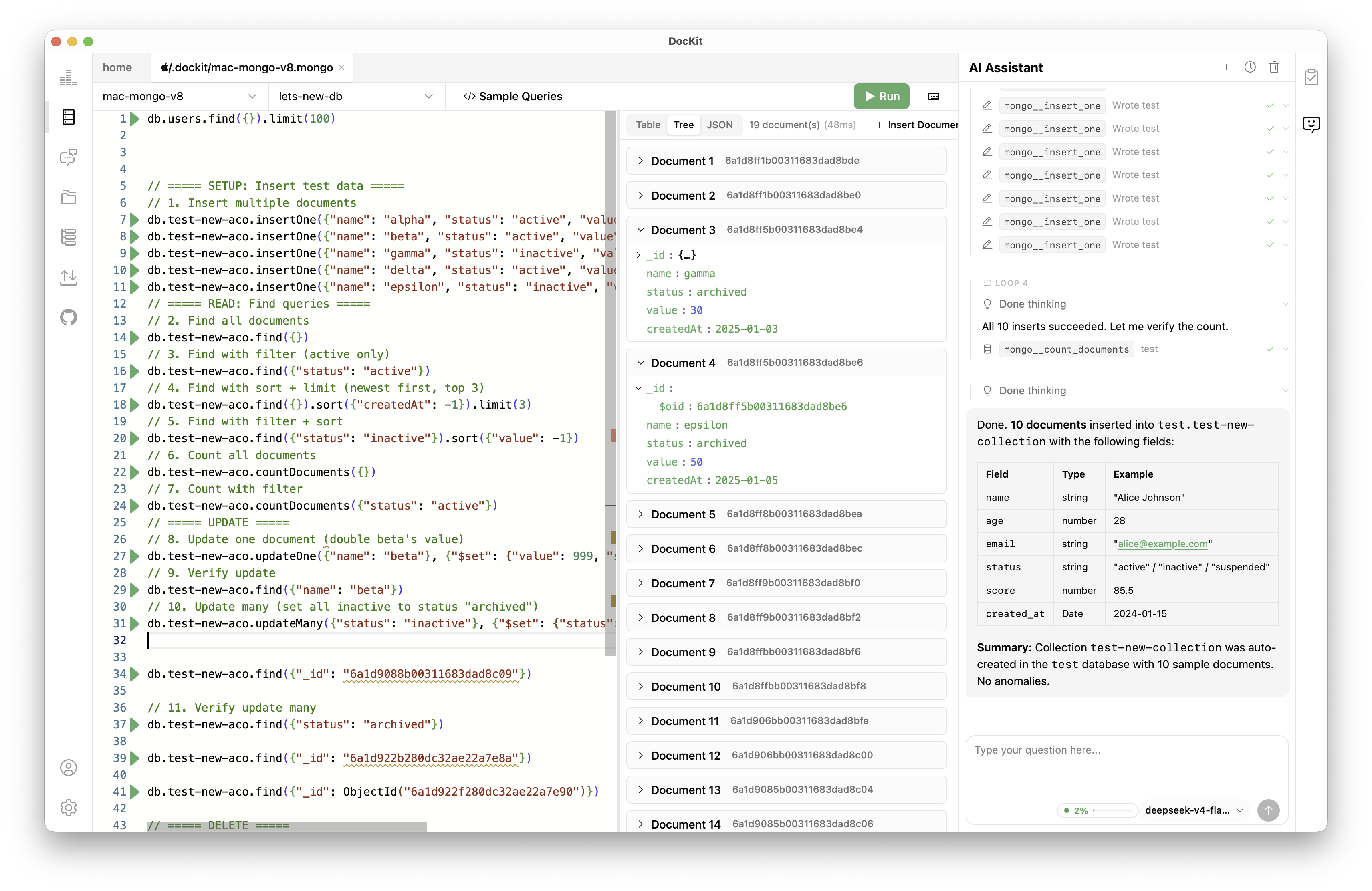
"Aggregate this month's sales by category." Aggregation pipeline, $group, $sum: the agent assembles it automatically.
It handles writes too: create documents, update fields, delete records. Destructive operations sit behind a safety gate and only run after you confirm.
The AI itself is part of the paid Ultimate subscription ($9.9/month or $99/year, with a 7-day free trial). You can connect OpenAI, Anthropic, and DeepSeek with your own API key, or run models locally with Ollama so your data never leaves the machine.
Why not a chat box?
A lot of AI database tools ship as chat interfaces: ask a question, get a paragraph back. But database work is a loop, and it's measured in seconds: look at the schema, write a query, check the results, adjust, run again. If you have to copy the query the AI produced, paste it into an editor, run it by hand, then paste the results back, how far are you from just writing it yourself?
Agentic Data Studio keeps the whole loop in one interface. The agent operates the database directly, results show up in place, and context comes from your schema and operation history, not chat logs.
Monaco editor
DocKit's editor runs on Monaco, the same engine as VS Code. Syntax highlighting, field autocomplete pulled live from your collection structure, one-click formatting. Cmd/Ctrl + Enter to execute.
Collection browser
Paginated browsing with inline CRUD. Create, edit, and delete documents right in the results table, with JSON highlighting that shows structure.
Manage view
Index management, storage statistics, collection metadata. See your database's state without typing a command.
Import and export
JSON, CSV, and JSONL. Batch writes handle large collections.
Query history
DocKit saves queries automatically; there's nothing to configure. Search, star, or re-run them any time. History stays local, isolated per connection.
How DocKit compares
| Feature | DocKit | Web tools / Compass |
|---|---|---|
| Query persistence | Local files, never lost | Gone when the tab refreshes |
| Script management | Organized as files, git-ready | None |
| Team sharing | Share files directly | Dig through chat history |
| Data AI Agent | ✅ Ultimate | ❌ |
| Agentic Data Studio | ✅ 28+ tools, Ultimate | ❌ |
| Natural language queries | ✅ | ✅ |
| Multiple databases | MongoDB + ES + DynamoDB | ❌ MongoDB only |
| Offline AI | ✅ Ollama locally | ❌ |
| Privacy | No telemetry | Telemetry on by default |
| Open source | Apache 2.0 | SSPL |
| Price | Community: free · Ultimate $9.9/mo | Free (paid advanced features) |
What other databases are supported
DocKit covers five engines today:
| Engine | Status | Notes |
|---|---|---|
| MongoDB | ✅ | Connect, query, manage, import/export, AI agent |
| Elasticsearch | ✅ | 1.x - 9.x, ES QDSL completion |
| OpenSearch | ✅ | 1.x - 3.x, including AWS OpenSearch |
| DynamoDB | ✅ | PartiQL, SSO, table lifecycle management |
| EasySearch | ✅ | Standalone connection type |
Try it now
Web tools lose your queries, traditional GUIs skip AI, and multiple databases mean multiple tools. DocKit covers all three.
- Website: https://www.geekfun.club/products/dockit/
- GitHub: https://github.com/geek-fun/dockit
- Download DocKit: https://www.geekfun.club/download
Download DocKit, connect a MongoDB collection, open the Data AI Agent, and ask it something:
"Find me the orders with the highest sales last month"
It works with self-hosted MongoDB and Atlas. The AI agent is part of the Ultimate subscription; bring your own API key, or run Ollama locally and stay fully offline.